
Best SMTP relay services in 2026
Updated:
For a business that needs a dependable SMTP relay in 2026, Mailtrap, Mailgun, SendPulse and SMTP2GO are the strongest picks, and each includes a dedicated IP on a plan for 100,000 emails. Mailtrap scores 80 of 100 and relays 10,000 emails for $15 a month. Mailgun scores 77 of 100 and lets each domain send through US or EU servers. SendPulse also scores 77 of 100, relays up to 12,000 emails a month for free at up to 50 an hour and 400 a day, and includes a dedicated IP at $74.85. SMTP2GO scores 74 of 100 and is the only relay here with phone support on every paid plan.
Amazon SES is the cheapest relay, $10 for 100,000 emails, if your team can manage AWS credentials, Regions and a sandbox start. Twilio SendGrid (72 of 100) suits high volumes, with 24/7 chat and up to 10,000 connections from one server.
 How we picked
A business relay has to accept the mail your servers and apps already build, and it should let you move to your own IP address without an enterprise contract. So this list keeps the full records with a standard SMTP relay and a dedicated IP you can have at 100,000 emails a month for $100 or less in total. Eight services pass, ordered by our score out of 100, with ties listed alphabetically.
Other services relay SMTP too but miss the dedicated IP test. Postmark’s needs 300,000 emails a month, Resend’s needs the Scale plan plus a $30 add-on, Bird Email (formerly SparkPost) needs the $250 Growth deposit, Brevo’s needs Professional, and Zoho ZeptoMail (now part of Zoho CPaaS) needs 10,000 emails a day. Mailchimp Transactional, Mailjet and MailerSend pass $100 a month at 100,000 emails once the IP is added, and Loops only sends its own templates over SMTP. All of them are on our main list of transactional email services.
The relays compared
 Mailtrap |
80of 100 | $15Basic 10,000 | $30Basic 100,000 | Included from Business 100,000 | Rated 2.8 out of 52.812 reviews (opens in a new tab) | |
|---|---|---|---|---|---|---|
 Mailgun |
77of 100 | $15Basic 10k | $75Foundation 100k | Included from Foundation 100kExtra IPs $59 a month | ticket | Rated 4.1 out of 54.11,555 reviews (opens in a new tab) |
 SendPulse SMTP |
77of 100 | $0Free plan | $74.85Pro 100,000 | Included from Pro 100,000 | chat, email, ticket | Rated 4.5 out of 54.52,895 reviews (opens in a new tab) |
 SMTP2GO |
74of 100 | $15Starter 10,000 | $75Professional 100,000 | Included from Professional 100,000Extra IPs $19 a month | ticket, chat, phone | Rated 4.8 out of 54.81,934 reviews (opens in a new tab) |
 Elastic Email |
73of 100 | $19Starter 50k | $29Starter 100k | $40 a month | email, chat | Rated 3.8 out of 53.8223 reviews (opens in a new tab) |
 Twilio SendGrid |
72of 100 | $19.95Essentials 50k | $34.95Essentials 100k | Included from Pro 100kExtra IPs $30 a month | ticket, chat | Rated 1.1 out of 51.1615 reviews (opens in a new tab) |
 Amazon SES |
66of 100 | $1À la carte | $10À la carte | $24.95 a month | community | Rated 1.2 out of 51.2439 reviews (opens in a new tab) |
 SocketLabs |
49of 100 | $39.95Core | $89.95Pro 100k | Included from Pro 100k | ticket, chat | Rated 1.5 out of 51.535 reviews (opens in a new tab) |
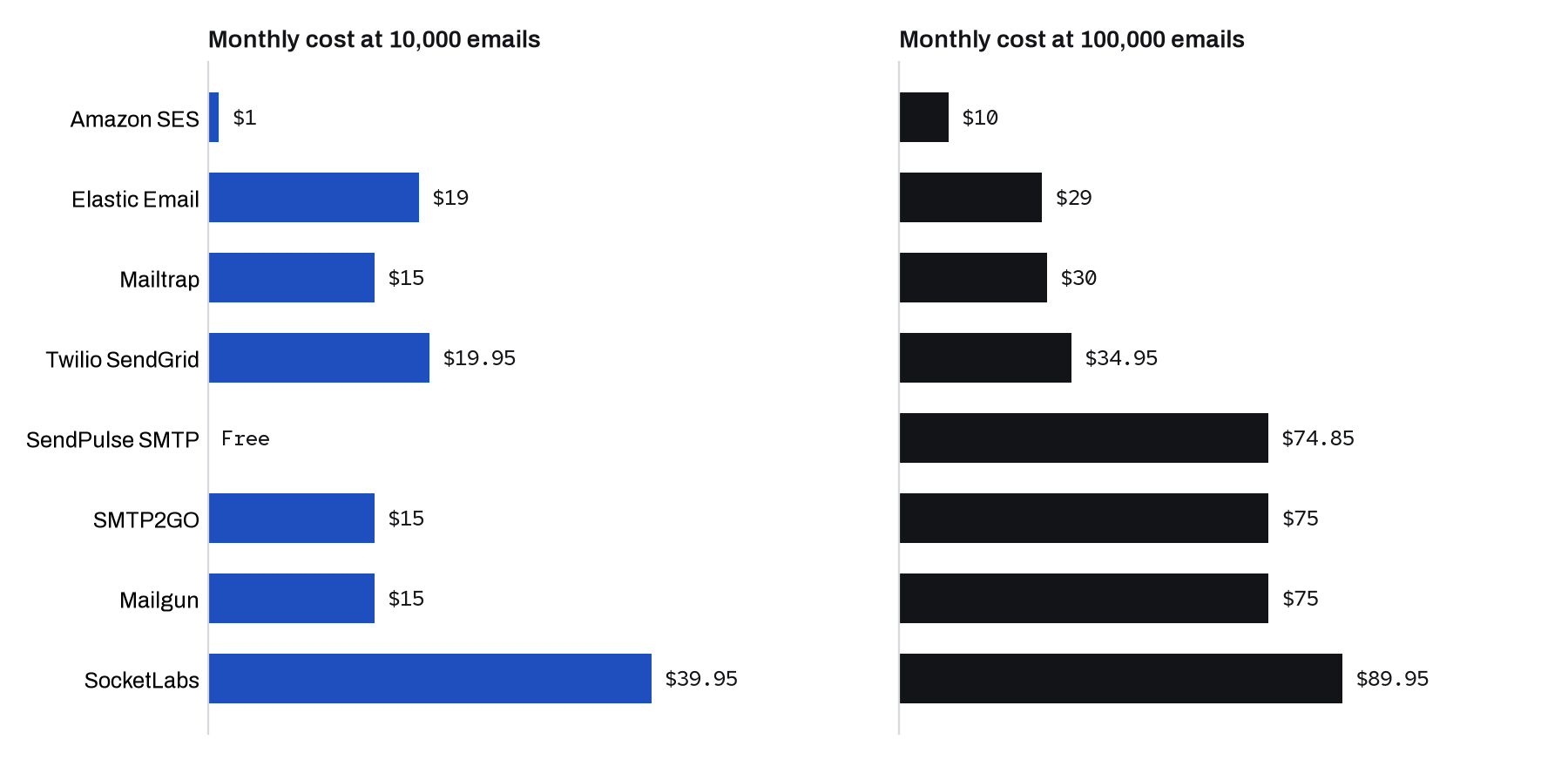
 How much does an SMTP relay cost?
At 10,000 emails a month, Amazon SES costs $1, SMTP2GO $15, Mailgun $15, Postmark $15, SendGrid $19.95 and Resend $20. At 100,000 emails, SES costs $10, SendGrid $34.95, Resend $35, SMTP2GO $75, Mailgun $75 and Postmark $115. SMTP2GO and Mailgun include a dedicated IP at that price, while SendGrid’s comes with Pro at $89.95.
Small offices can start free. SendPulse relays up to 12,000 emails a month at 50 an hour and 400 a day, Mailtrap 4,000 a month at 150 a day, and SMTP2GO 1,000 a month. SendGrid offers only a 60-day trial, and SocketLabs gives a free first month of Core. For other volumes, use our cost calculator.
 1. Mailtrap
Best for: A low-cost relay with a dedicated IP on Business
- Score
- 80 of 100
- 10,000 emails
- $15
- 100,000 emails
- $30
- Free plan
- 4,000 a month (150 a day)
- Trustpilot
- Rated 2.8 out of 52.812 reviews (opens in a new tab)
Mailtrap’s relay at live.smtp.mailtrap.io accepts ports 587, 465, 2525 and 25, allows 10 concurrent connections and 100 messages per connection, and supports IP allowlisting from Basic. Basic covers 100,000 emails for $30, and paid plans keep sending past the limit up to an unpublished cap. A dedicated IP with automatic warm-up comes with Business at $85, along with 24/7 chat. Watch the limits: new accounts start at 150 emails an hour, the deliverability team reviews each dedicated IP request and may insist on a shared IP, and Free and Basic get email support on weekdays only. No Mailtrap page offers a HIPAA BAA.
 2. Mailgun
Best for: Businesses that need US or EU servers
- Score
- 77 of 100
- 10,000 emails
- $15
- 100,000 emails
- $75
- Free plan
- 100 a day
- Trustpilot
- Rated 4.1 out of 54.11,555 reviews (opens in a new tab)
Mailgun’s relay has hosts in the US (smtp.mailgun.org) and the EU (smtp.eu.mailgun.org), with ports 25, 465, 587 and 2525 and SMTP credentials created per sending domain. Foundation 100k costs $75 with a dedicated IP and automated warm-up included. Overage rates are published for every tier, so you know the cost of a busy month in advance. Mailgun also publishes a HIPAA Business Associate Addendum tied to a Service Order. Watch support: Free, Basic and Foundation get tickets only, and chat and phone start on Scale. Basic allows 1 sending domain and keeps 1 day of logs.
 3. SendPulse SMTP
Best for: Small businesses that want free relay sending, then a bundled IP
- Score
- 77 of 100
- 10,000 emails
- $0
- 100,000 emails
- $74.85
- Free plan
- 12,000 a month (400 a day)
- Trustpilot
- Rated 4.5 out of 54.52,895 reviews (opens in a new tab)
SendPulse runs its relay on smtp-pulse.com with ports 2525, 465 and 587, and an option to accept connections only from white-listed IPs. The free plan sends 10,000 emails for $0 as long as you stay under 50 an hour and 400 a day. Paid subscriptions set hourly caps, 2,500 an hour at 25,000 emails and 8,000 at 100,000, where $74.85 includes a dedicated IP and unlimited sending domains. Paid plans get 24/7 chat. Watch the bounce rule: a bounce rate above 7% over 15 minutes cuts sending to 50 an hour. There is no inbound email or per-email overage, and some accounts wait up to 24 hours for a moderator review. No SendPulse page mentions SOC 2 or a HIPAA BAA.
4. SMTP2GO
Best for: Offices and devices that need a plain relay with phone support
- Score
- 74 of 100
- 10,000 emails
- $15
- 100,000 emails
- $75
- Free plan
- 1,000 a month (200 a day)
- Trustpilot
- Rated 4.8 out of 54.81,934 reviews (opens in a new tab)
SMTP2GO opens 8 ports on mail.smtp2go.com, including 80, 443 and 8025 for networks that block the usual ones, and can authenticate by IP address instead of a password on paid plans. Each email can carry 50 MB and 400 recipients, and there is an official cPanel and WHM plugin. Starter costs $15, and Professional costs $75 for 100,000 with a dedicated IP. All paid plans include ticket, chat and toll-free phone support. Watch the first days: new accounts are held to 1,000 emails a day until the review team activates them. Activity data is kept 30 days on paid plans.
 5. Elastic Email
Best for: Cheap relay volume with a private IP add-on
- Score
- 73 of 100
- 10,000 emails
- $19
- 100,000 emails
- $29
- Free plan
- 3,000 a month (100 a day)
- Trustpilot
- Rated 3.8 out of 53.8223 reviews (opens in a new tab)
Elastic Email’s relay at smtp.elasticemail.com takes ports 25, 2525, 587 and 465 and up to 15 SMTP credentials per account, each with an optional IP restriction. Starter covers 100,000 emails for $29, and a private IP adds $40 a month without a higher plan. Every plan includes email and in-app chat support, with an average response time of 1 day. Watch what Starter leaves out: delivery webhooks need Pro, logs are kept 3 days, and going over the volume moves you to the next tier. The account must be verified before it can send, and no Elastic Email page mentions HIPAA.
 6. Twilio SendGrid
Best for: High-volume relays with 24/7 chat
- Score
- 72 of 100
- 10,000 emails
- $19.95
- 100,000 emails
- $34.95
- Free plan
- Trial, 60 days
- Trustpilot
- Rated 1.1 out of 51.1615 reviews (opens in a new tab)
SendGrid’s relay at smtp.sendgrid.net takes the username apikey and an API key as the password, on ports 25, 587, 2525 and 465. One connection carries up to 5,000 messages, and one server can open up to 10,000 connections. Paid plans get ticket and live chat support around the clock, and Pro at $89.95 includes a dedicated IP, with extra IPs at $30 a month. Watch the costs: 10,000 emails still cost $19.95, the overage rate is not published, and invoicing needs a committed spend of $12,000 a year. Twilio will not sign a HIPAA BAA for SendGrid.
 7. Amazon SES
Best for: Relays for servers already running on AWS
- Score
- 66 of 100
- 10,000 emails
- $1
- 100,000 emails
- $10
- Free plan
- One-time credit
- Trustpilot
- Rated 1.2 out of 51.2439 reviews (opens in a new tab)
Amazon SES relays through email-smtp.<region>.amazonaws.com on ports 25, 587, 2587, 465 and 2465, with TLS required. The SMTP username and password are generated per Region from IAM credentials, and US Regions have FIPS endpoints. It costs $10 for 100,000 emails at the à la carte rate, and a standard dedicated IP is $24.95 a month on any plan. SES is HIPAA eligible under the AWS Business Associate Addendum. Watch the setup: each Region starts in its own sandbox of 200 emails a day, AWS gives a first response to production requests within 96 hours, and technical support needs a paid AWS Support plan.
 8. SocketLabs
Best for: Business senders who want a reviewed, US-hosted relay
- Score
- 49 of 100
- 10,000 emails
- $39.95
- 100,000 emails
- $89.95
- Free plan
- Trial
- Trustpilot
- Rated 1.5 out of 51.535 reviews (opens in a new tab)
SocketLabs is a business-only relay: signup asks for a work email, a phone number and a public website, and a person reviews new accounts, usually within 30 minutes during US Eastern business hours. The relay at smtp.socketlabs.com takes ports 25, 2525, 587 and 465 and messages up to 40 MB. Core costs $39.95 for 40,000 emails, and Pro 100k at $89.95 adds a dedicated IP and phone support. Watch the edges: bandwidth over the allotment costs $10 per GB, support runs 9 AM to 5 PM Eastern on weekdays, and data is hosted in the US with no EU region.
 SMTP settings: host, ports and login
Every relay here accepts port 587 and port 465, and all but Amazon SES also take port 2525 as a fallback when a network blocks 587. SES uses 2587 and 2465 instead and needs a separate host and credentials in each AWS Region. SendGrid and Mailtrap take a fixed username, apikey or api, with an API key as the password, while Mailgun, SMTP2GO and SocketLabs create SMTP users per domain or server.
| Service | SMTP host | Ports | Username | Password |
|---|---|---|---|---|
| Mailtrap | live.smtp.mailtrap.io |
587, 465, 2525, 25 | The literal word api | An API token (each domain has its own tokens, and one is generated when the domain is added) |
| Mailgun | smtp.mailgun.org (US), smtp.eu.mailgun.org (EU) |
25, 465, 587, 2525 | An SMTP credential login created per sending domain | The password set for that SMTP credential |
| SendPulse SMTP | smtp-pulse.com |
2525, 465, 587 | SMTP login shown in SMTP > Dashboard > Connection using server settings (the PHPMailer guide calls it your SendPulse email login) | SMTP password shown in the same place, changeable with Change password |
| Twilio SendGrid | smtp.sendgrid.net |
25, 587, 2525, 465 | The literal word apikey | Your SendGrid API key |
| SMTP2GO | mail.smtp2go.com |
25, 2525, 8025, 587, 80, 465, 8465, 443 | An SMTP User username created under Sending, SMTP Users | The password set for that SMTP User |
| Elastic Email | smtp.elasticemail.com |
25, 2525, 587, 465 | The account login email by default, or another unique email address set on the SMTP credential | A generated SMTP password, shown only once when the credential is created |
| Amazon SES | email-smtp.<region>.amazonaws.com, for example email-smtp.us-east-1.amazonaws.com |
25, 587, 2587, 465, 2465 | SMTP user name created in the SES console (an IAM access key ID) | SMTP password generated by SES, derived from the IAM secret access key and different for each Region. It is not the secret access key itself. |
| SocketLabs | smtp.socketlabs.com |
25, 2525, 587, 465 | Server SMTP username from Configuration, Key Manager (format like server12345) | SMTP password from Configuration, Key Manager |
SMTP2GO opens the most ports and has regional hosts for the US, the EU and Australia, plus an EU-only host, mail-eu2.smtp2go.com. Mailgun domains created in its EU region use smtp.eu.mailgun.org. AWS throttles port 25 on EC2 by default, so connect to SES on 587 or 465. To lock the relay to your own servers, Mailtrap offers IP allowlisting from Basic, SendPulse a white-listed IPs setting and Elastic Email an IP restriction on each credential. The SMTP ports guide explains the difference between 465 and 587.
 Dedicated IPs: which plans include one
SendPulse, Mailgun, SendGrid, SMTP2GO and SocketLabs include one dedicated IP on their 100,000-email plans, and Mailtrap includes one on Business. Amazon SES rents one for $24.95 a month on any plan, and Elastic Email adds one to Starter for $40 a month. A new IP needs warm-up. Mailtrap’s takes about 3 weeks, and its deliverability team may insist that you stay on a shared IP.
| Service | Plan with a dedicated IP | Monthly price | Extra IPs |
|---|---|---|---|
| Mailtrap | Business 100,000, included | $85 | Not documented |
| Mailgun | Foundation 100k, included | $75 | $59 a month each |
| SendPulse | Pro 100,000, included | $74.85 | Up to 5 more, price not published |
| Twilio SendGrid | Pro 100k, included | $89.95 | $30 a month each |
| SMTP2GO | Professional 100,000, included | $75 | $19 a month each |
| Elastic Email | Starter 100k with a private IP add-on | $29 plus $40 | $40 a month on Starter, $50 on Pro |
| Amazon SES | Any plan, standard dedicated IP | $10 in sending plus $24.95 | $24.95 a month each, or managed IPs from $15 a month plus usage |
| SocketLabs | Pro 100k, included | $89.95 | Multiple IPs on Enterprise only |
Vendors tie dedicated IPs to volume for a reason. Mailtrap recommends one from 100,000 emails a month, and Twilio suggests at least 2 SendGrid IPs at 250,000 messages a month.
 Limits: new accounts and the monthly quota
Every relay here limits new accounts until it trusts them. Amazon SES starts in a sandbox of 200 emails a day, SMTP2GO holds new accounts to 1,000 a day until its review team activates them, and Mailtrap starts at 150 an hour. At the monthly quota, Mailgun and SMTP2GO bill overage, SendPulse and Elastic Email move you up a tier, and Mailtrap rejects mail past an unpublished overage cap.
| Service | New account | At the monthly quota |
|---|---|---|
| Mailtrap | 150 emails an hour, raised automatically on paid plans | Overage up to an unpublished cap, then rejected |
| Mailgun | Sandbox domain with 5 authorized recipients, unverified domains 300 a day | Overage at published rates |
| SendPulse | SMTP Test plan of 50 emails in total at 10 an hour until a domain is authenticated, or a moderator review of up to 24 hours, then free plan 50 an hour and 400 a day, paid plans from 2,500 an hour | No overage, and a card or PayPal subscription can be upgraded automatically |
| Twilio SendGrid | Trial 100 a day, credit limits lifted after verification steps | Overage at an unpublished rate |
| SMTP2GO | 1,000 a day until the review team activates the account | Overage up to 3 times the plan, then sending stops |
| Elastic Email | Account verification first, free plan 100 a day | No overage, automatic or manual upgrade to the next tier |
| Amazon SES | Sandbox of 200 a day and 1 a second, verified recipients only | Pay per email, quotas raised through Service Quotas |
| SocketLabs | Automated check, human review, sandbox and automatic warm-up | Overage per email, server suspended above double the allowance by default |
 Which SMTP relay is the most reliable?
We do not measure uptime or inbox placement, so we report what vendors publish. All eight relays here run a public status page. Mailtrap’s about page cites a 99.99% uptime SLA, SMTP2GO offers a 100% delivery SLA with money back if emails are not delivered, and Mailgun’s terms compensate downtime with service credits capped at 50% of monthly fees. For the others, ask for SLA terms before you rely on them.
| Service | Status page | Support on the cheapest paid plan |
|---|---|---|
| Mailtrap | Mailtrap status (opens in a new tab) | Email on weekdays, 24/7 email and chat from Business |
| Mailgun | Mailgun status (opens in a new tab) | Tickets, with chat and phone from Scale |
| SendPulse | SendPulse status (opens in a new tab) | Chat, email and tickets, 24/7 |
| Twilio SendGrid | SendGrid status (opens in a new tab) | Tickets and live chat, 24/7 |
| SMTP2GO | SMTP2GO status (opens in a new tab) | Tickets, live chat and toll-free phone |
| Elastic Email | Elastic Email status (opens in a new tab) | Email and in-app chat, average reply in 1 day |
| Amazon SES | AWS Health Dashboard (opens in a new tab) | AWS re:Post and docs, technical help on a paid AWS Support plan |
| SocketLabs | SocketLabs status (opens in a new tab) | Tickets and chat, 9 AM to 5 PM Eastern on weekdays |
SocketLabs’ contact page currently says live chat is temporarily unavailable and asks customers to email support.
Also worth a look
These relays have short records in our dataset, so they are not scored.
- SMTP.com sells 50,000 emails for $25 a month on a shared IP, with a dedicated IP from Starter at $80 for 100,000 emails and phone support on weekdays, though we could not confirm its SMTP host and ports.
- turboSMTP has a free plan of 200 emails a day, covers 100,000 emails for $29.95 on Basic and includes a dedicated IP from Pro at $79.95, with 24/7 chat and tickets and phone support from Pro.
- SendLayer costs $25 a month for 10,000 emails on
smtp.sendlayer.netport 587, billed annually only, and needs a custom quote from 20,000 emails.
Which to choose
- You need phone support on a small plan. SMTP2GO includes ticket, chat and toll-free phone support on every paid plan. See the SMTP2GO review.
- You want free relay sending for a small office. SendPulse’s free plan allows 12,000 emails a month at up to 50 an hour and 400 a day. See the SendPulse review.
- Your servers run on AWS. Amazon SES relays 100,000 emails for $10, but connect on 587 or 465 because EC2 throttles port 25. See the Amazon SES review.
- You need EU servers. Mailgun has an EU relay host, and SMTP2GO has an EU-only host. See the Mailgun review.
- You relay mail from WordPress. Plugin support differs by service. See the SMTP for WordPress ranking.
- You want Postmark and can skip a dedicated IP. Postmark keeps transactional and broadcast mail on separate SMTP hosts. See the Postmark review.
 Frequently asked questions
What is the best SMTP relay service in 2026?
By our score, Mailtrap leads the SMTP relay list in 2026, followed by Mailgun, SendPulse and SMTP2GO, and each includes a dedicated IP on a plan for 100,000 emails. SMTP2GO is the pick for phone support on every paid plan, and Amazon SES is the cheapest at volume.
Which SMTP port should I use for a relay?
Use 587 with STARTTLS or 465 with implicit TLS. All eight relays on this list accept both, and all but Amazon SES also accept 2525 as a fallback, while SES offers 2587 and 2465. Our SMTP ports guide explains the difference.
Do I need a dedicated IP for my SMTP relay?
Usually only at higher volume. Mailtrap recommends one from 100,000 emails a month and warms it up over about 3 weeks, and Twilio suggests at least 2 SendGrid IPs at 250,000 messages a month. SendPulse, Mailgun, SendGrid, SMTP2GO and SocketLabs include one on their 100,000-email plans.
Can Amazon SES be used as an SMTP relay?
Yes. Amazon SES has SMTP endpoints in 19 AWS Regions on ports 25, 587, 2587, 465 and 2465, and TLS is required. Each Region needs its own SMTP credentials and starts in a sandbox of 200 emails a day until AWS grants production access.
Sources
Prices and features come from each vendor's own pages, and other facts from the pages listed here, read on the dates shown. Prices exclude sales tax.
- Mailtrap pricing (opens in a new tab), checked November 18, 2026
- Mailgun pricing (opens in a new tab), checked November 18, 2026
- SendPulse SMTP pricing (opens in a new tab), checked November 18, 2026
- SMTP2GO pricing (opens in a new tab), checked November 18, 2026
- Elastic Email pricing (opens in a new tab), checked November 18, 2026
- Twilio SendGrid pricing (opens in a new tab), checked November 18, 2026
- Amazon SES pricing (opens in a new tab), checked November 18, 2026
- SocketLabs pricing (opens in a new tab), checked November 18, 2026