
Best WordPress SMTP services for WordPress and WooCommerce in 2026
Updated:
Brevo, SMTP2GO, Mailgun, Elastic Email and Postmark are the easiest services to run on WordPress and WooCommerce: each has a free, dedicated mailer in WP Mail SMTP, FluentSMTP and Post SMTP, and each publishes its own WordPress plugin. At 10,000 emails a month, SMTP2GO costs $15, Mailgun $15, Postmark $15 and Brevo $17, and Brevo’s free plan covers 300 emails a day. Mailtrap and Resend have the highest overall scores, but Mailtrap has a dedicated mailer only in Post SMTP, as does SendPulse. Bird Email (formerly SparkPost) and Twilio SendGrid have mailers in all three plugins, though both of their own plugins have been closed.
 Why WordPress and WooCommerce emails go missing
WordPress sends mail with wp_mail(), which the WordPress developer reference for wp_mail (opens in a new tab) describes as similar to PHP’s mail function. Its source code sets PHPMailer to use PHP’s mail(), so by default your web host’s server sends each message. A true return value only means the request was processed without errors, not that anyone received the email.
The default sender is wordpress@ followed by your site’s domain, and a comment in the same source warns that some hosts block outgoing mail from that address if it does not exist. The WooCommerce email troubleshooting page (opens in a new tab) says WooCommerce sends mail through wp_mail() by default, that email problems are often deliverability issues where the server sends but the mail is not received, and suggests signing up with a dedicated SMTP provider. An SMTP plugin, or a vendor’s own plugin, routes wp_mail() through that provider instead of the web server.
 How we picked
This ranking includes every service we score that has a dedicated mailer, rather than a generic Other SMTP connection, in at least one of three widely used plugins: WP Mail SMTP (about 4,000,000 active installs), FluentSMTP (700,000) or Post SMTP (300,000). The 14 that qualify are ordered by our score, which does not include WordPress support. ZeptoMail and SocketLabs have their own plugins but no mailer in the three, so they appear under Also worth a look.
 The services compared
Mailtrap and Resend lead on score, but for most WordPress sites the WP Mail SMTP column matters more. It shows whether the free version of WP Mail SMTP has a mailer for the service, whether that mailer needs Pro, or whether you would connect through its generic Other SMTP option. The price columns show the cheapest published plan for 10,000 and 100,000 emails a month on monthly billing.
 Mailtrap |
80of 100 | Other SMTP | $15Basic 10,000 | $30Basic 100,000 | 4,000 a month (150 a day) | Rated 2.8 out of 52.812 reviews (opens in a new tab) |
|---|---|---|---|---|---|---|
 Resend |
80of 100 | Free version | $20Pro 50,000 | $35Pro 100,000 | 3,000 a month (100 a day) | Rated 2.5 out of 52.523 reviews (opens in a new tab) |
 Bird Email |
78of 100 | Free version | $15Email Startup | $40Email Startup | 1,000 a month (50 a day) | Rated 1.6 out of 51.623 reviews (opens in a new tab) |
 Mailgun |
77of 100 | Free version | $15Basic 10k | $75Foundation 100k | 100 a day | Rated 4.1 out of 54.11,555 reviews (opens in a new tab) |
 SendPulse SMTP |
77of 100 | Other SMTP | $0Free plan | $74.85Pro 100,000 | 12,000 a month (400 a day) | Rated 4.5 out of 54.52,895 reviews (opens in a new tab) |
 Brevo |
74of 100 | Free version | $17Starter 10,000 | $82Starter 100,000 | 9,000 a month (300 a day) | Rated 3.8 out of 53.87,263 reviews (opens in a new tab) |
 Mailchimp Transactional |
74of 100 | Free version | $201 block | $804 blocks | 500 one-time | Rated 2.5 out of 52.51,565 reviews (opens in a new tab) |
 SMTP2GO |
74of 100 | Free version | $15Starter 10,000 | $75Professional 100,000 | 1,000 a month (200 a day) | Rated 4.8 out of 54.81,934 reviews (opens in a new tab) |
 Elastic Email |
73of 100 | Free version | $19Starter 50k | $29Starter 100k | 3,000 a month (100 a day) | Rated 3.8 out of 53.8223 reviews (opens in a new tab) |
 Mailjet |
72of 100 | Free version | $19Essential 15k | $112Premium 100k | 6,000 a month (200 a day) | Rated 4.0 out of 54.04,042 reviews (opens in a new tab) |
 Twilio SendGrid |
72of 100 | Free version | $19.95Essentials 50k | $34.95Essentials 100k | Trial, 60 days | Rated 1.1 out of 51.1615 reviews (opens in a new tab) |
 MailerSend |
68of 100 | Free version | $14.50Hobby | $68Starter 100K | 500 a month | Rated 4.2 out of 54.2232 reviews (opens in a new tab) |
 Amazon SES |
66of 100 | Pro only | $1À la carte | $10À la carte | One-time credit | Rated 1.2 out of 51.2439 reviews (opens in a new tab) |
 Postmark |
64of 100 | Free version | $15Basic 10,000 | $115Basic 125,000 | 100 a month | Rated 1.8 out of 51.850 reviews (opens in a new tab) |
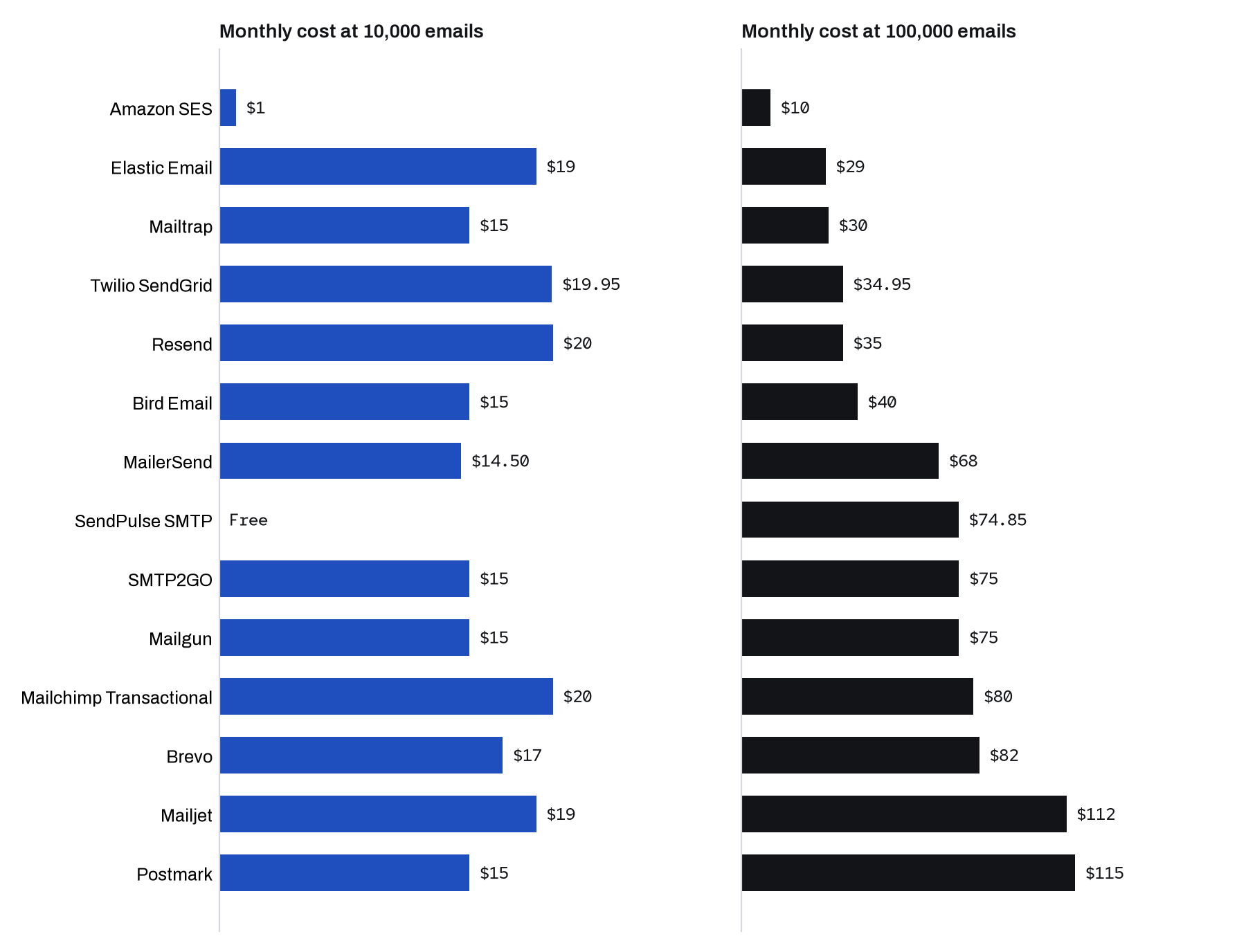
 Which services work with WP Mail SMTP, FluentSMTP and Post SMTP?
WP Mail SMTP’s free version has mailers for 11 of these 14 services and supports Amazon SES only in Pro. FluentSMTP is free with no Pro version and supports 8 of them, including Amazon SES. Post SMTP’s free version supports 13, and Amazon SES again needs Pro. For email logs, FluentSMTP and Post SMTP log emails for free, while WP Mail SMTP keeps its email log for paid licenses.
“Generic SMTP” means the plugin has no mailer for the service, but you can still enter the service’s SMTP host and login. The last column lists plugins on wordpress.org that the vendor publishes and that send WordPress mail through its service, with active installs.
| Service | WP Mail SMTP | FluentSMTP | Post SMTP | Vendor’s own plugin |
|---|---|---|---|---|
| Mailtrap | Generic SMTP | Generic SMTP | Free | None |
| Resend | Free | Generic SMTP | Free | Resend (500) |
| Bird Email (listed as SparkPost) | Free | Free | Free | Closed in 2025 |
| Mailgun | Free | Free | Free | Mailgun for WordPress (70,000) |
| SendPulse | Generic SMTP | Generic SMTP | Free | None that sends mail |
| Twilio SendGrid | Free | Free | Free | Closed in 2021 |
| Brevo | Free | Free | Free | Brevo (100,000) |
| Mailchimp Transactional (listed as Mandrill) | Free | Generic SMTP | Free | None |
| SMTP2GO | Free | Free | Free | SMTP2GO for WordPress (40,000) |
| Elastic Email | Free | Free | Free | Elastic Email Sender (10,000) |
| Mailjet | Free | Generic SMTP | Free | Mailjet Email Marketing (10,000) |
| MailerSend | Free | Generic SMTP | Free | MailerSend Official SMTP Integration (2,000) |
| Amazon SES | Pro | Free | Pro | None |
| Postmark | Free | Free | Free | ActiveCampaign Postmark for WordPress (50,000) |
 1. Mailtrap
Best for: Developers who test WordPress mail before it goes live
- Score
- 80 of 100
- 10,000 emails
- $15
- 100,000 emails
- $30
- Free plan
- 4,000 a month (150 a day)
- Trustpilot
- Rated 2.8 out of 52.812 reviews (opens in a new tab)
Mailtrap shares the top score here with Resend, 80 of 100, but it takes the most setup on WordPress. Post SMTP is the only one of the three plugins with a Mailtrap mailer, and the Mailtrap for WordPress plugin on wordpress.org is labeled third party and non-official. Mailtrap’s docs point to WP Mail SMTP or Post SMTP and have no WooCommerce guide. What you get is low-cost volume: Basic covers 10,000 emails for $15 and 100,000 for $30, and the free plan allows 150 emails a day. Logs last 3 days on Free and 5 days on Basic, which is short for tracing a lost order email.
Strengths
- Basic covers 100,000 emails for $30 a month with SMTP, API, webhooks, templates and inbound email included.
- Paid plans keep sending past the monthly limit at $1.00 per 1,000 extra emails on Basic, $0.88 on Business and $0.55 on Enterprise.
- A batch endpoint sends up to 500 different messages in one API call, and official SDKs cover 8 languages including Go and Elixir.
Limits
- Email logs are kept for 3 days on Free, 5 days on Basic and 15 days on Business.
- A dedicated IP needs Business at $85 a month or more, and the deliverability team reviews each request and may insist on a shared IP.
- Overage is capped at an unpublished amount, and emails beyond the cap are rejected until you upgrade.
 2. Resend
Best for: Developers who want production access on the day they sign up
- Score
- 80 of 100
- 10,000 emails
- $20
- 100,000 emails
- $35
- Free plan
- 3,000 a month (100 a day)
- Trustpilot
- Rated 2.5 out of 52.523 reviews (opens in a new tab)
Resend has free mailers in WP Mail SMTP and Post SMTP but none in FluentSMTP. A plugin named Resend sits under Resend’s wordpress.org account with about 500 active installs, though its page does not call itself official. Resend’s own WordPress guide recommends WP Mail SMTP with Other SMTP settings instead, using smtp.resend.com on port 465 with the username resend, and it does not mention WooCommerce. Every account gets production access at signup, and the free plan allows 100 emails a day. Pro covers 10,000 emails for $20 and 100,000 for $35. All stored data stays in the US.
Strengths
- The free plan is permanent and includes 3,000 emails a month, 100 a day and 3 domains.
- Pro costs $20 a month for 50,000 emails and $35 for 100,000, with overage at $0.90 per 1,000.
- Every account gets production access at signup with no sandbox or approval wait.
Limits
- Resend says it is not HIPAA compliant and cannot sign a Business Associate Agreement.
- All stored data stays in the United States even when mail is sent from the Ireland region.
- Overage only applies after you turn on Transactional Overages, and the default cap pauses sending at 400% of the monthly quota.
 3. Bird Email
Best for: Sites that also need SMS or WhatsApp
- Score
- 78 of 100
- 10,000 emails
- $15
- 100,000 emails
- $40
- Free plan
- 1,000 a month (50 a day)
- Trustpilot
- Rated 1.6 out of 51.623 reviews (opens in a new tab)
Bird Email has dedicated mailers in all three plugins, listed under its old name, SparkPost. The SparkPost WordPress plugin was closed on wordpress.org on March 11, 2025 for a security issue, and Bird has no plugin of its own. Bird also says existing SparkPost code does not carry over unchanged, because Bird Email has its own API and credentials, so the SMTP relay at us1.smtp.bird.com with the username bird is the other route. The free plan allows 1,000 emails a month and 50 a day. Paid plans are a monthly deposit charged per email, and 10,000 emails cost $15 a month.
Strengths
- Startup pricing of $0.40 per 1,000 emails means 100,000 emails a month cost about $40 from a $15 deposit.
- Every plan, including Free, includes the email API, SMTP relay, inbound email, scheduled sending, templates and open and click tracking.
- Unused deposit balance carries forward and can also pay for Bird SMS, WhatsApp or voice usage.
Limits
- The $15 Startup deposit is charged every month even if you send only a few hundred emails, and deposits are non-refundable.
- Dedicated IPs cost $24.95 per IP per month and require the Growth plan with its $250 monthly deposit.
- Bird's acceptable use policy bars protected health information unless agreed in writing, and no BAA is offered publicly.
 4. Mailgun
Best for: Stores that want an official plugin plus inbound routing
- Score
- 77 of 100
- 10,000 emails
- $15
- 100,000 emails
- $75
- Free plan
- 100 a day
- Trustpilot
- Rated 4.1 out of 54.11,555 reviews (opens in a new tab)
Mailgun works in all three plugins for free and publishes Mailgun for WordPress, with about 70,000 active installs. Mailgun’s WordPress integration page lists WooCommerce receipts and shipping notices as a use case, but its WooCommerce directory entry has no setup content. The plugin readme carries a security notice that versions 2.2.0 and earlier had vulnerabilities, so keep it updated. Basic covers 10,000 emails for $15, though it allows 1 sending domain and keeps logs for 1 day. Sending can run in US or EU regions.
Strengths
- Overage rates are published for every tier, from $1.80 per 1,000 on Basic down to $0.40 on Scale 2.5M.
- One account can send from US or EU regions, and message data stays in the region where it is processed.
- Inbound routing, webhooks, templates and batch sends of up to 1,000 recipients per call are part of the platform.
Limits
- Basic at $15 allows only 1 sending domain, 1 API key, 1 user and 1 day of logs.
- Chat and phone support, SAML SSO and 30 days of logs start on Scale at $90 a month.
- Messages sent in test mode are still charged.
 5. SendPulse SMTP
Best for: Small stores that want a large free allowance
- Score
- 77 of 100
- 10,000 emails
- $0
- 100,000 emails
- $74.85
- Free plan
- 12,000 a month (400 a day)
- Trustpilot
- Rated 4.5 out of 54.52,895 reviews (opens in a new tab)
SendPulse’s free plan sends 12,000 emails a month, but it caps sending at 50 an hour and 400 a day, which a busy store can hit. The free plan starts only after you authenticate a domain, and on SendPulse’s older setup moderators review the profile first. Post SMTP is the only one of the three plugins with a SendPulse mailer, which signs in with an API ID and secret. SendPulse’s own WordPress plugins add subscription forms and live chat and do not route WordPress mail. Its WooCommerce plugin syncs orders and customers to SendPulse CRM and does not send store email. SendPulse’s help center shows SMTP setup in MailPoet, in WP Mail SMTP through Other SMTP and in Easy WP SMTP. Past the free plan, 50,000 emails cost $16.85 a month.
Strengths
- The free plan includes 12,000 emails a month over SMTP or API, with no card and no expiry date.
- Paid subscriptions cost $8.85 a month for 25,000 emails and $16.85 for 50,000 on monthly billing.
- Every subscription from 100,000 emails a month ($74.85) includes a dedicated IP and unlimited sending domains.
Limits
- The free plan is capped at 50 emails an hour and 400 a day, so 12,000 a month needs evenly spread traffic.
- The price jumps from $16.85 at 50,000 emails to $74.85 at 100,000 because no 100,000 subscription comes without the bundled dedicated IP.
- There is no per-email overage price, and the terms allow a card or PayPal subscription to be upgraded automatically when the limit is exceeded.
 6. Brevo
Best for: Stores that send newsletters and order email from one account
- Score
- 74 of 100
- 10,000 emails
- $17
- 100,000 emails
- $82
- Free plan
- 9,000 a month (300 a day)
- Trustpilot
- Rated 3.8 out of 53.87,263 reviews (opens in a new tab)
Brevo is supported for free in all three plugins and publishes its own plugin, which has about 100,000 active installs, the most of any vendor plugin here. Its readme says to use Brevo’s SMTP for transactional email such as order confirmations and password resets, and a separate Brevo for WooCommerce plugin (30,000 installs) covers WooCommerce email templates. The free plan sends 300 emails a day, but sending starts only after Brevo approves the account, and free emails carry the Sent with Brevo sticker. Starter covers 10,000 emails for $17. Brevo hosts all account data in the EU.
Strengths
- The free plan sends up to 300 emails a day with API, SMTP and webhooks, and needs no credit card.
- Starter costs $17 a month for 10,000 emails and $82 a month for 100,000 emails on monthly billing.
- All account data is hosted in the EU, in France and Germany, and Brevo holds ISO 27001:2022 certification.
Limits
- Paid plans have no per-email overage, so sending is suspended when the monthly quota runs out.
- A dedicated IP is only sold as an add-on to the $499 a month Professional plan, and its price is not published.
- Starter stops at 100,000 emails a month and Standard at 500,000, so 1,000,000 emails needs Professional at $999 a month.
 7. Mailchimp Transactional
Best for: Stores already paying for Mailchimp Standard
- Score
- 74 of 100
- 10,000 emails
- $20
- 100,000 emails
- $80
- Free plan
- 500 one-time
- Trustpilot
- Rated 2.5 out of 52.51,565 reviews (opens in a new tab)
WP Mail SMTP and Post SMTP list Mailchimp Transactional under its old name, Mandrill, and FluentSMTP has no mailer for it. The former wpMandrill plugin was closed on wordpress.org on November 3, 2023 for a security issue, and Mailchimp says it does not create or maintain third-party plugins. Mailchimp for WooCommerce syncs store data for marketing and does not send order emails. One block of 25,000 emails costs $20 a month, but Transactional works only with a paid Mailchimp Standard or higher plan, which is billed separately and not included in that price.
Strengths
- Blocks of 25,000 emails cost $20 each, so 100,000 emails a month costs $80 in blocks.
- The block price falls to $18 from 21 blocks and to $10 from 161 blocks, which makes 1,000,000 emails cost $720 a month.
- It includes inbound email routing, webhooks, templates, subaccounts and scheduled sending up to one year ahead.
Limits
- It only works as an add-on to a paid Mailchimp Standard or Premium plan, which is billed separately from $20 a month.
- The smallest purchase is one 25,000-email block at $20, even if you send only a few thousand emails.
- Unused emails expire each month, and sending stops when blocks run out unless automatic top-off is turned on.
Mailchimp Transactional reviewPricing page (opens in a new tab)
8. SMTP2GO
Best for: WooCommerce stores that want the vendor's own plugin and guide
- Score
- 74 of 100
- 10,000 emails
- $15
- 100,000 emails
- $75
- Free plan
- 1,000 a month (200 a day)
- Trustpilot
- Rated 4.8 out of 54.81,934 reviews (opens in a new tab)
SMTP2GO is supported for free in all three plugins, and its official plugin, with about 40,000 active installs, replaces wp_mail and sends through the SMTP2GO API. SMTP2GO’s WooCommerce setup guide points to that plugin, so store email has a documented path from the vendor. The free plan allows 1,000 emails a month and 200 a day, and Starter covers 10,000 emails for $15. Paid plans add live chat and phone support to tickets. New accounts are held to 1,000 emails a day until the review team fully activates them.
Strengths
- The free plan allows 1,000 emails a month and 200 a day with no time limit.
- Monthly plans cost $15 for 10,000, $30 for 50,000, $75 for 100,000 and $520 for 1,000,000 emails.
- Overage keeps mail flowing past the quota at $1.20 per 1,000 on the 10,000 plan down to $0.50 on the 1,000,000 plan.
Limits
- Paid plans show activity data for 30 days, and longer storage or email archiving costs extra.
- The API feature list has no inbound email processing.
- Overage stops at 3 times the plan's monthly limit, after which you must upgrade.
 9. Elastic Email
Best for: Stores that will pass 50,000 emails a month
- Score
- 73 of 100
- 10,000 emails
- $19
- 100,000 emails
- $29
- Free plan
- 3,000 a month (100 a day)
- Trustpilot
- Rated 3.8 out of 53.8223 reviews (opens in a new tab)
Elastic Email is supported for free in all three plugins. Its Elastic Email Sender plugin, with about 10,000 installs, replaces wp_mail with the Elastic Email API and lists WooCommerce as compatible, and was last updated December 3, 2025. Elastic Email’s WooCommerce page links to the plugin but gives no setup steps. Starter covers 50,000 emails for $19, which is also the price at 10,000 because there is no smaller paid tier, and 100,000 cost $29. Webhooks need the Pro plan, and logs are kept 3 days on Free and Starter.
Strengths
- Starter costs $19 a month for 50,000 emails, $29 for 100,000 and $269 for 1,000,000.
- A private IP is a $40 monthly add-on on the $19 Starter plan, so a dedicated IP does not need a high tier.
- SMTP accepts ports 25, 2525, 587 and 465, and 12 official SDKs come with a downloadable OpenAPI spec.
Limits
- Webhooks, inbound email processing and subaccounts are Pro only, which raises the entry price from $19 to $49 at 50,000 emails.
- Email logs are kept for 3 days on Free and Starter and 7 days on Pro.
- There is no per-email overage, so going past the plan volume means an automatic or manual upgrade to the next tier.
 10. Mailjet
Best for: WooCommerce notifications from the vendor's own plugin
- Score
- 72 of 100
- 10,000 emails
- $19
- 100,000 emails
- $112
- Free plan
- 6,000 a month (200 a day)
- Trustpilot
- Rated 4.0 out of 54.04,042 reviews (opens in a new tab)
Mailjet has free mailers in WP Mail SMTP and Post SMTP but not in FluentSMTP. Its official Mailjet Email Marketing plugin, with about 10,000 installs, has a setting that routes WordPress mail over Mailjet’s SMTP relay. It also has WooCommerce support built in for new order, shipped and refund notifications plus abandoned cart emails. Version 6.2.4 fixed CVE-2026-39791, which exposed WooCommerce customer email addresses, so run a current version. The free plan sends 200 emails a day with the Mailjet logo, and 10,000 emails cost $19 on Essential. All data is stored in the EU.
Strengths
- The free plan sends 6,000 emails a month, up to 200 a day, with API, SMTP relay and webhooks, and needs no credit card.
- Starter costs $9 a month for 8,000 emails and Essential costs $19 for 15,000 with unlimited contacts.
- One account covers campaigns and transactional sending through Send API v3.1 or SMTP, with SDKs in 7 languages.
Limits
- Unused email credits expire each billing cycle, and the overage rate is not shown on the pricing page.
- Essential stops at 50,000 emails, so 100,000 a month needs Premium at $112.
- Inbound email through the Parse API requires Premium 50k or higher.
 11. Twilio SendGrid
Best for: Larger stores that want a dedicated IP later
- Score
- 72 of 100
- 10,000 emails
- $19.95
- 100,000 emails
- $34.95
- Free plan
- Trial, 60 days
- Trustpilot
- Rated 1.1 out of 51.1615 reviews (opens in a new tab)
Twilio SendGrid has free mailers in all three plugins. Its own WordPress plugin was closed on wordpress.org on July 13, 2021 at the author’s request, so you connect through one of those mailers. SendGrid does not document a WooCommerce setup. There is no permanent free plan, only a 60-day trial at 100 emails a day, and the smallest tier covers 50,000 emails, so a store sending 10,000 a month pays $19.95. Essentials keeps 3 days of activity, and Twilio does not publish its overage rate. A dedicated IP is included from Pro at $89.95 a month.
Strengths
- SMTP and the v3 Mail Send API come with official SDKs in 7 languages, and Mail Send accepts up to 10,000 requests per second.
- Pro starts at $89.95 a month for 100,000 emails and includes 1 dedicated IP, subusers and SSO.
- Inbound Parse, event webhooks, dynamic templates and scheduling up to 72 hours ahead are part of the Email API.
Limits
- The permanent free plan is gone, and new accounts get a 60-day trial capped at 100 emails a day.
- Overage fees apply above each tier, but Twilio does not publish the per-email rate.
- Essentials keeps only 3 days of searchable activity and Pro keeps 7 days, unless you buy more history.
 12. MailerSend
Best for: Replacing WooCommerce's default emails with designed templates
- Score
- 68 of 100
- 10,000 emails
- $14.50
- 100,000 emails
- $68
- Free plan
- 500 a month
- Trustpilot
- Rated 4.2 out of 54.2232 reviews (opens in a new tab)
MailerSend is supported for free in WP Mail SMTP and Post SMTP and publishes two plugins. Its official SMTP integration has about 2,000 installs, and its WooCommerce plugin, with about 100, replaces 11 default WooCommerce emails with MailerSend templates sent over the API. Hobby covers 5,000 emails for $7 a month, and 10,000 cost $14.50 with overage. Hobby keeps activity data for 1 day, the free plan needs a credit card, and accounts must be approved before full sending. All customer data is hosted in the EU.
Strengths
- The $7 Hobby plan includes 5,000 emails, so 10,000 emails a month cost $14.50 with $1.50 per 1,000 overage.
- Starter covers 50,000 emails for $35 and 100,000 emails for $68 a month on monthly billing.
- Inbound routing is included on every plan, including Free.
Limits
- The free plan requires a credit card and allows 500 emails a month with 100 API requests a day.
- Hobby keeps activity data for 1 day and allows 1,000 API requests a day and 1 domain.
- Dedicated IPs cost $50 a month and start on Professional at $110 a month, for senders of at least 100,000 emails a week.
 13. Amazon SES
Best for: Sites already on AWS that want the lowest price
- Score
- 66 of 100
- 10,000 emails
- $1
- 100,000 emails
- $10
- Free plan
- One-time credit
- Trustpilot
- Rated 1.2 out of 51.2439 reviews (opens in a new tab)
FluentSMTP is the only one of the three plugins that supports Amazon SES in its free version. WP Mail SMTP and Post SMTP need their paid Pro versions for an SES mailer, and AWS publishes no WordPress plugin. At à la carte rates, 10,000 emails cost $1 and 100,000 cost $10, but new accounts start on the Essentials plan at $0.16 per 1,000 emails instead of $0.10 until you cancel it. Every new account starts in a sandbox of 200 emails per 24 hours to verified addresses, and AWS gives a first response to production access requests within 96 hours. Bounce and delivery events go to AWS services such as SNS rather than to a webhook.
Strengths
- À la carte sending costs $0.10 per 1,000 emails with no monthly fee, so 100,000 emails cost about $10 a month.
- SES is on the AWS HIPAA eligible services list, and the AWS Business Associate Addendum is accepted in AWS Artifact.
- SES runs in more than 30 AWS Regions, including 8 in Europe, and data stays in the Region you pick.
Limits
- New accounts default to the Essentials plan at $0.16 per 1,000 emails, 60% more than the $0.10 à la carte rate, until you cancel the plan.
- Every new account starts in a sandbox limited to 200 emails per 24 hours to verified recipients, and AWS gives a first response to production requests within 96 hours.
- Delivery and bounce events go to SNS, EventBridge, Firehose or CloudWatch, so receiving webhooks takes extra AWS setup.
 14. Postmark
Best for: Stores that keep order email and newsletters apart
- Score
- 64 of 100
- 10,000 emails
- $15
- 100,000 emails
- $115
- Free plan
- 100 a month
- Trustpilot
- Rated 1.8 out of 51.850 reviews (opens in a new tab)
Postmark is supported for free in all three plugins and publishes ActiveCampaign Postmark for WordPress, with about 50,000 installs. That plugin was last updated November 18, 2024 and is tested up to WordPress 6.7.11, so check it against your WordPress version. Postmark’s support FAQ says any plugin that sends through wp_mail is compatible but does not mention WooCommerce. Basic covers 10,000 emails for $15, and 100,000 cost $115 on the 125,000 tier. Every new account is reviewed by hand, which takes less than 24 hours on weekdays.
Strengths
- Plans start at $15 a month for 10,000 emails, and every paid plan allows unlimited emails per day.
- Transactional and broadcast mail run on separate message streams with separate SMTP hosts.
- Pro adds inbound processing for $16.50 a month at 10,000 emails, and activity retention of up to 365 days is a paid add-on from $5 a month.
Limits
- Postmark says it is not HIPAA compliant and cannot sign a Business Associate Agreement.
- Basic overage costs $1.80 per 1,000 emails, and 100,000 emails a month means buying the $115 tier for 125,000.
- All data is hosted in the US near Chicago and on AWS, with no plans for EU servers.
Which service is best for WooCommerce order emails?
Any service on this page can send WooCommerce order emails once a plugin routes wp_mail() through it. Seven vendors in our data also have a page about sending WooCommerce store email: Brevo, Mailjet, SMTP2GO, MailerSend, Elastic Email, ZeptoMail and Maileroo. SMTP2GO’s guide points to its own plugin, and Mailjet’s plugin has order, shipping and refund notifications built in. Check what a vendor’s WooCommerce plugin does before you install it, because some only sync store data.
- Plugins that send store email. MailerSend’s WooCommerce plugin replaces 11 default WooCommerce emails with its templates. Mailjet’s plugin covers new order, shipped and refund notifications. Zoho publishes a ZeptoMail for WooCommerce plugin with about 200 installs.
- Pages that point to a general plugin. SMTP2GO’s guide uses its WordPress plugin. Elastic Email’s WooCommerce page links to Elastic Email Sender without setup steps. Maileroo’s page recommends the SMTP and Email Logs for WooCommerce extension rather than its plugin.
- Plugins that only sync data. SendPulse’s WooCommerce plugin sends customers and orders to SendPulse CRM, and Mailchimp for WooCommerce syncs store data for marketing. Neither sends order emails.
- Logs for lost orders. FluentSMTP logs every email in its free version, and Post SMTP’s free version logs too. WP Mail SMTP’s email log needs a paid license.
Also worth a look
These services also reach WordPress, but either we keep shorter records for them and do not score them, or they have no mailer in the three plugins.
- SendLayer is the first recommended mailer in WP Mail SMTP but has no mailer in FluentSMTP or Post SMTP, and it bills yearly only, with 10,000 emails a month at $25 a month.
- SMTP.com has free mailers in WP Mail SMTP and Post SMTP plus its own plugin, which needs a paid SMTP.com account and PHP 8.3, and its smallest plan covers 50,000 emails for $25.
- Zoho ZeptoMail (now part of Zoho CPaaS) has no mailer in the three plugins, but Zoho’s own ZeptoMail plugin, with about 5,000 installs, routes WordPress mail, and credits cost $2.50 per 10,000 emails.
- SocketLabs publishes a plugin with about 800 installs that routes WordPress mail, though its setup guide dates from December 14, 2017, and Core costs $39.95 a month.
- turboSMTP publishes an official plugin with about 400 installs whose readme says it handles WooCommerce emails, and its free plan allows 200 emails a day.
- Maileroo has a Post SMTP mailer and its own Simple SMTP plugin with about 800 installs, and its free plan covers 3,000 emails a month.
Which to choose
- You run a small WooCommerce store and want the vendor’s own plugin. SMTP2GO’s plugin and WooCommerce guide work together, with 1,000 free emails a month. See the SMTP2GO review.
- You also send newsletters to your customers. Brevo’s plugin covers both, and its free plan sends 300 emails a day. See the Brevo review.
- You use the free version of WP Mail SMTP. Pick a service with a free mailer there, such as Mailgun or Postmark, rather than Amazon SES, which needs Pro. See the Mailgun review and the Postmark review.
- You host on AWS and want the lowest per-email price. Amazon SES works with the free FluentSMTP plugin. See the Amazon SES review and Mailgun vs Amazon SES.
- You want the largest free allowance. SendPulse’s 12,000 free emails a month work through Post SMTP’s SendPulse mailer, within 400 a day and 50 an hour. See the SendPulse review.
- You are leaving SendGrid. All three plugins support most of its alternatives. See our SendGrid alternatives and the ranking of SMTP relay services.
 Frequently asked questions
What is the best SMTP plugin for WordPress?
It depends on the service you send through. WP Mail SMTP is the most installed, with about 4,000,000 active installs, but its email log is a Pro feature. FluentSMTP is free with no Pro version and logs every email, and Post SMTP has dedicated mailers for the most services in our data, including SendPulse and Mailtrap.
Why are my WooCommerce order emails not arriving?
WooCommerce sends mail with WordPress’s wp_mail() function, which by default hands it to your web host’s server through PHP’s mail(). WooCommerce’s own troubleshooting page says email problems are often deliverability issues and suggests signing up with a dedicated SMTP provider.
Does Amazon SES work with WP Mail SMTP?
WP Mail SMTP has an Amazon SES mailer only in its paid Pro version. FluentSMTP supports Amazon SES in its free version, and Post SMTP also needs its Pro version for an Amazon SES mailer.
Does SendGrid have a WordPress plugin?
Not anymore. The official SendGrid plugin was closed on wordpress.org on July 13, 2021 at the author’s request, so sites connect through the SendGrid mailer in WP Mail SMTP, FluentSMTP or Post SMTP.
Which email services have an official WordPress plugin?
Among the services ranked here, Brevo, Mailgun, Postmark, SMTP2GO, Elastic Email, Mailjet and MailerSend publish plugins that send WordPress mail through their service, and a plugin under Resend’s wordpress.org account does the same. Brevo’s has the most active installs, about 100,000.
Sources
Prices and features come from each vendor's own pages, and other facts from the pages listed here, read on the dates shown. Prices exclude sales tax.
- Mailtrap pricing (opens in a new tab), checked November 18, 2026
- Resend pricing (opens in a new tab), checked November 18, 2026
- Bird Email pricing (opens in a new tab), checked November 18, 2026
- Mailgun pricing (opens in a new tab), checked November 18, 2026
- SendPulse SMTP pricing (opens in a new tab), checked November 18, 2026
- Brevo pricing (opens in a new tab), checked November 18, 2026
- Mailchimp Transactional pricing (opens in a new tab), checked November 18, 2026
- SMTP2GO pricing (opens in a new tab), checked November 18, 2026
- Elastic Email pricing (opens in a new tab), checked November 18, 2026
- Mailjet pricing (opens in a new tab), checked November 18, 2026
- Twilio SendGrid pricing (opens in a new tab), checked November 18, 2026
- MailerSend pricing (opens in a new tab), checked November 18, 2026
- Amazon SES pricing (opens in a new tab), checked November 18, 2026
- Postmark pricing (opens in a new tab), checked November 18, 2026
- wp_mail() function reference (WordPress Developer Resources) (opens in a new tab), read November 18, 2026
- Email troubleshooting (WooCommerce documentation) (opens in a new tab), read November 18, 2026
- WP Mail SMTP by WPForms (WordPress plugin directory) (opens in a new tab), read November 18, 2026
- FluentSMTP (WordPress plugin directory) (opens in a new tab), read November 18, 2026
- Post SMTP (WordPress plugin directory) (opens in a new tab), read November 18, 2026